mywheel package
Submodules
mywheel.array_like module
- class mywheel.array_like.RepeatArray(value: Any, size: int)[source]
Bases:
object- get(_item: Any) Any[source]
The get function returns the value of the object.
- Parameters:
_item – The underscore _item is a convention in Python to indicate that a parameter is not going to be used in the function. In this case, the parameter is ignored and not used in the function logic
- Returns:
The value of the self.value attribute is being returned.
Examples
>>> repeat_array = RepeatArray(1, 5)
>>> repeat_array.get(0)
1
>>> repeat_array.get(1)
1
>>> repeat_array.get(2)
1
>>> repeat_array.get(3)
1
>>> repeat_array.get(4)
1
- size
- value
- class mywheel.array_like.ShiftArray(*args: Any, **kwargs: Any)[source]
Bases:
listThe ShiftArray class is a subclass of the built-in list class that allows indexing and setting values with an arbitrary starting index.
- items() Iterator[tuple[int, Any]][source]
The items function returns an iterator that yields tuples containing the index and value of each element in the object.
- Returns:
The items method is returning an iterator that yields tuples containing the index (starting from self.start) and the corresponding value for each element in the object.
Examples
>>> shift_array = ShiftArray([1, 2, 3, 4, 5])
>>> shift_array.set_start(3)
>>> for i, v in shift_array.items():
...     print(i, v)
3 1
4 2
5 3
6 4
7 5
- set_start(start: int) None[source]
The function sets the value of the “start” attribute.
- Parameters:
start – The start parameter is a value that will be assigned to the start attribute of the object
Examples
>>> shift_array = ShiftArray([1, 2, 3, 4, 5])
>>> shift_array.set_start(3)
>>> shift_array[6]
4
>>> shift_array[7]
5
>>> shift_array[3]
1
>>> shift_array[4]
2
>>> shift_array[5]
3
mywheel.bpqueue module
BPQueue (Bounded Priority Queue)
This code implements a Bounded Priority Queue (BPQueue) data structure. The purpose of this data structure is to efficiently manage and prioritize items within a specific range of integer keys. It’s particularly useful when you need to handle a large number of items with priorities that fall within a known, limited range.
The BPQueue takes two main inputs when initialized: a lower bound (a) and an upper bound (b) for the priority range. These bounds define the valid range of priorities for items in the queue. The queue can then accept items (represented by the Item type, which is a doubly-linked list node) along with their associated priority values.
The main outputs of the BPQueue are the items themselves, typically retrieved in order of highest priority. The queue provides methods to add items, remove the highest-priority item, modify item priorities, and iterate through the items in descending priority order.
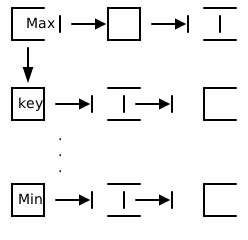
The BPQueue achieves its purpose through a clever combination of an array (called buckets) and doubly-linked lists. Each bucket in the array corresponds to a specific priority level. Items with the same priority are stored in the same bucket using a doubly-linked list. This structure allows for fast insertion, deletion, and priority modifications.
The key logic flows in the BPQueue involve maintaining the correct order of items and efficiently updating the maximum priority. When items are added or their priorities are changed, the code ensures they are placed in the correct bucket. The queue keeps track of the highest non-empty bucket (_max), allowing for quick access to the highest-priority items.
An important data transformation happens when inserting items: the external priority value is converted to an internal index by subtracting an offset. This allows the queue to use array indices efficiently, even when the priority range doesn’t start at zero.
The BPQueue also includes an iterator (BPQueueIterator) that allows for traversing the items in descending priority order. This iterator moves through the buckets from highest to lowest, yielding items from each non-empty bucket.
Overall, the BPQueue provides a specialized data structure that offers efficient operations for managing prioritized items within a bounded range, making it useful for scenarios where fast priority-based access and modifications are required.
- class mywheel.bpqueue.BPQueue(a: int, b: int)[source]
Bases:
objectThe BPQueue class is a bounded priority queue implementation using an array of doubly-linked lists, optimized for small integer keys.
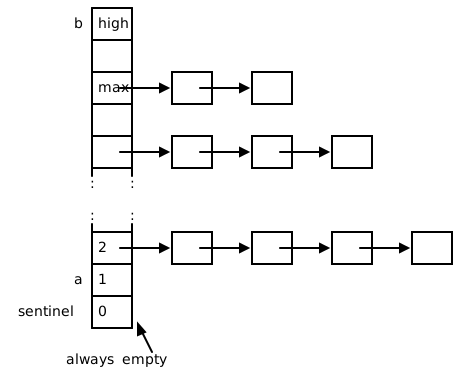
Bounded Priority Queue with integer keys in [a..b]. Implemented by array (bucket) of doubly-linked lists. Efficient if key is bounded by a small integer value.
Note that this class does not own the PQ nodes. This feature makes the nodes sharable between doubly linked list class and this class. In the FM algorithm, the node either attached to the gain buckets (PQ) or in the waitinglist (doubly linked list), but not in both of them in the same time.
Another improvement is to make the array size one element bigger i.e. (b - a + 2). The extra dummy array element (which is called sentinel) is used to reduce the boundary checking during updating.
All member functions assume that the keys are within the bound.
- append(it: Dllink[List[int]], k: int) None[source]
The append function appends an item with an external key to a priority queue.
- Parameters:
it (Item) – The parameter “it” is of type Dllink, which is a class or object that represents a doubly linked list node. It is used to store the item that needs to be appended to the BPQueue
k (int) – The parameter k represents the external key that is associated with the item being appended to the BPQueue
Examples
>>> bpq = BPQueue(-3, 3)
>>> a = Dllink([0, 3])
>>> bpq.append(a, 0)
>>> bpq.is_empty()
False
>>> a.data[0]
4
- appendleft(it: Dllink[List[int]], k: int) None[source]
The appendleft function appends an item with an external key to a priority queue.
- Parameters:
it (Item) – The parameter “it” is of type Dllink, which is a class or object that represents a doubly linked list node. It is used to store the item that needs to be appended to the BPQueue
k (int) – The parameter k represents the external key that is associated with the item being appended to the BPQueue
Examples
>>> bpq = BPQueue(-3, 3)
>>> a = Dllink([0, 3])
>>> b = Dllink([0, 4])
>>> c = Dllink([0, 5])
>>> bpq.appendleft(a, 0)
>>> bpq.appendleft(b, 1)
>>> bpq.appendleft(c, 0)
>>> bpq.get_max()
1
>>> bpq.popleft().data[1]
4
>>> bpq.popleft().data[1]
5
>>> bpq.popleft().data[1]
3
- appendleft_direct(it: Dllink[List[int]]) None[source]
The appendleft_direct function appends an item to a list using its internal key.
- Parameters:
it (Item) – The parameter it is of type Item, which is a class or data structure representing an item
Examples
>>> bpq = BPQueue(-3, 3)
>>> a = Dllink([0, 3])
>>> bpq.appendleft_direct(a)
>>> bpq.is_empty()
False
- decrease_key(it: Dllink[List[int]], delta: int) None[source]
The decrease_key function decreases the key of an item by a specified delta and updates the item’s position in a bucket data structure.
- Parameters:
it (Item) – it is a reference to an item in a doubly linked list
delta (int) – The parameter “delta” represents the change in the key value of the item. It is an integer value that determines how much the key value should be decreased
- Returns:
There is no return statement in the code, so nothing is being returned.
Note
The order of items with same key will not be preserved. For FM algorithm, this is a prefered behavior.
Items will be inserted if they are not in the BPQueue
Examples
>>> bpq = BPQueue(-3, 3)
>>> a = Dllink([0, 3])
>>> b = Dllink([0, 4])
>>> bpq.appendleft(a, 0)
>>> bpq.appendleft(b, -1)
>>> bpq.get_max()
0
>>> bpq.decrease_key(a, 1)
>>> a.data[0]
3
>>> bpq.get_max()
-1
>>> bpq.popleft().data[1]
4
>>> bpq.popleft().data[1]
3
- detach(it: Dllink[List[int]]) None[source]
The detach function detachs an item from a priority queue.
- Parameters:
it (Item) – The parameter “it” is of type Dllink, which is a class or object that represents a doubly linked list node to be detached from the BPQueue
Examples
>>> bpq = BPQueue(-3, 3)
>>> a = Dllink([0, 3])
>>> bpq.appendleft(a, 0)
>>> bpq.detach(a)
>>> bpq.is_empty()
True
- get_max() int[source]
The get_max function returns the maximum value in a BPQueue object.
- Returns:
The method get_max returns the maximum value, which is an integer.
Examples
>>> bpq = BPQueue(-3, 3)
>>> bpq.get_max()
-4
- increase_key(it: Dllink[List[int]], delta: int) None[source]
The increase_key function increases the key of an item by a given delta and updates the item’s position in a bucket list.
- Parameters:
it (Item) – it is a variable of type Item, which represents an item in a data structure
delta (int) – The delta parameter in the increase_key function represents the change in the key value of the item it. It is an integer value that determines how much the key value should be increased
Note
The order of items with same key will not be preserved. For FM algorithm, this is a prefered behavior.
Items will be inserted if they are not in the BPQueue
Examples
>>> bpq = BPQueue(-3, 3)
>>> a = Dllink([0, 3])
>>> b = Dllink([0, 4])
>>> bpq.appendleft(a, 0)
>>> bpq.appendleft(b, -1)
>>> bpq.get_max()
0
>>> bpq.increase_key(b, 2)
>>> b.data[0]
5
>>> bpq.get_max()
1
>>> bpq.popleft().data[1]
4
>>> bpq.popleft().data[1]
3
- is_empty() bool[source]
The is_empty function checks if a BPQueue object is empty.
- Returns:
The method is returning a boolean value, indicating whether the object is empty or not.
Examples
>>> bpq = BPQueue(-3, 3)
>>> bpq.is_empty()
True
- modify_key(it: Dllink[List[int]], delta: int) None[source]
The modify_key function modifies the key of an item by a specified delta and updates the item’s position in a bucket data structure.
- Parameters:
it (Item) – it is a reference to an item in a doubly linked list
delta (int) – The parameter “delta” represents the change in the key value of the item. It is an integer value that determines how much the key value should be modified
- Returns:
There is no return statement in the code, so nothing is being returned.
Note
The order of items with same key will not be preserved. For FM algorithm, this is a prefered behavior.
Items will be inserted if they are not in the BPQueue
Examples
>>> bpq = BPQueue(-3, 3)
>>> a = Dllink([0, 3])
>>> bpq.appendleft(a, 0)
>>> bpq.modify_key(a, 1)
>>> a.data[0]
5
>>> bpq.modify_key(a, -2)
>>> a.data[0]
3
>>> bpq.modify_key(a, 0) # no change
>>> a.data[0]
3
- set_key(it: Dllink[List[int]], gain: int) None[source]
The function set_key sets the key value of an item by subtracting the offset from the given gain value.
- Parameters:
it (Item) – The it parameter is of type Item and represents the item for which the key value is being set
gain (int) – The gain parameter is an integer representing the key value that will be set for the item
Examples
>>> bpq = BPQueue(-3, 3)
>>> a = Dllink([0, 3])
>>> bpq.set_key(a, 0)
>>> a.data[0]
4
- class mywheel.bpqueue.BPQueueIterator(bpq: BPQueue)[source]
Bases:
objectThe BPQueueIterator class is a bounded priority queue iterator that allows traversal of the queue in descending order.
Bounded Priority Queue Iterator. Traverse the queue in descending order. Detaching queue items may invalidate the iterator because the iterator makes a copy of current key.
mywheel.dllist module
Doubly Linked List Implementation
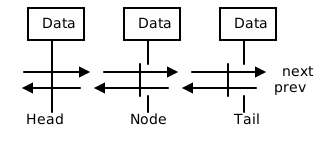
This code implements a doubly linked list data structure in Python. A doubly linked list is a type of data structure where each element (node) contains data and links to both the next and previous elements in the list.
The purpose of this code is to provide a flexible and efficient way to store and manipulate collections of data. It’s particularly useful when you need to frequently insert or remove elements from the middle of a list, as these operations can be performed quickly in a doubly linked list.
The code doesn’t take any specific inputs or produce outputs on its own. Instead, it provides a set of tools (classes and methods) that programmers can use to create and manipulate doubly linked lists in their own programs. Users of this code can create lists, add elements to them, remove elements, and iterate through the lists.
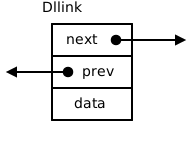
The Dllink class represents individual nodes in the list. Each node contains three pieces of information: the data it holds, a reference to the next node, and a reference to the previous node. The Dllist class represents the entire list, using a special “head” node as a reference point for the start of the list.
The code achieves its purpose through a series of methods that manipulate these nodes and their connections. For example, the attach method in Dllink adds a new node after the current one by adjusting the next and previous references of the affected nodes. The appendleft and append methods in Dllist add new nodes to the beginning or end of the list, respectively.
An important aspect of this implementation is that it doesn’t keep track of the list’s length. This design choice saves memory and processing time, as the length doesn’t need to be updated with each operation. However, it means that if a user needs to know the length of the list, they would need to count the elements manually.
The code also includes an iterator (DllIterator) that allows users to easily traverse the list from beginning to end. This is particularly useful for processing all elements in the list in order.
Overall, this doubly linked list implementation provides a powerful and flexible tool for managing collections of data, especially in situations where frequent insertions and deletions are needed throughout the list.
- class mywheel.dllist.DllIterator(link: Dllink[T])[source]
Bases:
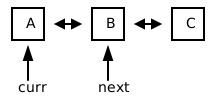
Generic[T]The DllIterator class is a list iterator that allows traversal of a doubly linked list from the first item.
- class mywheel.dllist.Dllink(data: T)[source]
Bases:
Generic[T]The Dllink class is a doubly linked list implementation that does not keep track of the length of the list.
A Doubly-linked List class. This class simply contains a link of node’s. By adding a “head” node (sentinel), deleting a node is extremely fast (see “Introduction to Algorithm”). This class does not keep the length information as it is not necessary for the FM algorithm. This saves memory and run-time to update the length information. Note that this class does not own the list node. They are supplied by the caller in order to better reuse the nodes.
Examples
>>> a = Dllink(3)
- attach(node: Dllink[T]) None[source]
The attach function appends a node to the front of a doubly linked list.
- Parameters:
node ("Dllink[T]") – The node parameter is an instance of the Dllink class
Examples
>>> a = Dllink(3)
>>> b = Dllink(4)
>>> a.attach(b)
- data: T
- detach() None[source]
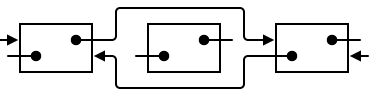
The detach function removes a node from a doubly linked list by updating the previous and next pointers of the surrounding nodes.
Examples
>>> a = Dllink(3)
>>> b = Dllink(4)
>>> a.attach(b)
>>> b.detach()
- is_locked() bool[source]
The is_locked function returns True if the node is locked, and False otherwise.
- Returns:
The method is returning a boolean value indicating whether the node is locked or not.
Examples
>>> a = Dllink(3)
>>> a.is_locked()
True
- class mywheel.dllist.Dllist(data: T)[source]
Bases:
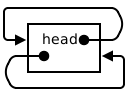
Generic[T]The Dllist class is a doubly linked list implementation that uses a “head” node for efficient deletion operations.
By adding a “head” node (sentinel), deleting a node is extremely fast (see “Introduction to Algorithm”). This class does not keep the length information as it is not necessary for the FM algorithm. This saves memory and run-time to update the length information. Note that this class does not own the list node. They are supplied by the caller in order to better reuse the nodes.

- append(node: Dllink[T]) None[source]
The append function adds a node to the end of a doubly linked list.
- Parameters:
node (Dllink[T]) – The node parameter is of type Dllink[T], which represents a node in a doubly linked list
Examples
>>> a = Dllist(3)
>>> b = Dllink(4)
>>> a.append(b)
>>> a.is_empty()
False
- appendleft(node: Dllink[T]) None[source]
The appendleft function appends a node to the front of a doubly linked list.
- Parameters:
node (Dllink[T]) – The node parameter is an instance of the Dllink class. It represents a node that you want to append to the front of the doubly linked list
Examples
>>> a = Dllist(3)
>>> b = Dllink(4)
>>> a.appendleft(b)
>>> a.is_empty()
False
- clear() None[source]
The clear function clears all elements from a doubly linked list.
Examples
>>> a = Dllist(3)
>>> a.clear()
>>> a.is_empty()
True
- is_empty() bool[source]
The is_empty function checks if a doubly linked list is empty.
- Returns:
a boolean value indicating whether the list is empty or not.
Examples
>>> a = Dllist(3)
>>> a.is_empty()
True

mywheel.map_adapter module
- class mywheel.map_adapter.MapAdapter(lst: List[T])[source]
-
- items() ItemsView[int, T][source]
The function returns an enumeration of the items in the list.
- Returns:
The items method is returning an enumeration of the lst attribute.
Examples
>>> a = MapAdapter([1, 4, 3, 6])
>>> for i, v in a.items():
...     print(f"{i}: {v}")
0: 1
1: 4
2: 3
3: 6
- lst
- values() ValuesView[T][source]
The values function returns an iterator that yields the elements of the lst attribute of the MapAdapter object.
- Returns:
The values method returns an iterator object.
Examples
>>> a = MapAdapter([1, 4, 3, 6])
>>> for i in a.values():
...     print(i)
1
4
3
6
mywheel.robin module
Round-Robin Implementation
This code implements a round-robin algorithm, which is a method for fairly distributing tasks or resources among a group of participants. The main purpose of this code is to create a circular list of elements and provide a way to iterate through them, starting from any given point.
The code defines three main classes: SlNode, RobinIterator, and Robin. SlNode represents a node in a singly-linked list, containing a data value and a reference to the next node. RobinIterator is responsible for iterating over the linked list, while Robin sets up the circular structure and provides a method to start iterating from a specific point.
The primary input for this code is the number of parts or elements in the round-robin cycle, which is provided when creating a Robin object. The main output is an iterator that allows you to cycle through the elements in the list, starting from a specified position.
To achieve its purpose, the code first creates a circular linked list using the SlNode class. Each node contains an integer value and a reference to the next node. The Robin class sets up this circular structure by creating a list of nodes and connecting them in a loop.
The key functionality is provided by the exclude method in the Robin class. This method takes an integer parameter representing the starting position and returns a RobinIterator object. The iterator allows you to cycle through the elements of the list, starting from the specified position and continuing until you’ve gone through all elements except the starting one.
An important aspect of the logic is how the iteration works. The RobinIterator keeps track of two pointers: curr (current) and stop. As you iterate, curr moves to the next node in the list. The iteration stops when curr reaches the stop node, which is set to the starting position. This ensures that you go through all elements exactly once before stopping.
In summary, this code provides a flexible way to implement a round-robin system, allowing users to start from any point in the cycle and iterate through all other elements before returning to the starting point. This can be useful in various scenarios, such as task scheduling or resource allocation, where you need to fairly distribute something among a group of participants in a circular manner.
- class mywheel.robin.Robin(num_parts: int)[source]
Bases:
objectRound Robin
The Robin class implements a round-robin algorithm for cycling through a list of parts, and the exclude method returns an iterator starting from a specified part.

- exclude(from_part: int) RobinIterator[source]
The exclude function returns a RobinIterator object that excludes a specified part of a cycle.
- Parameters:
from_part (int) – The from_part parameter is an integer that represents the starting index of the cycle that should be excluded
- Returns:
The exclude method is returning a RobinIterator object.
Examples
>>> r = Robin(5)
>>> iter = r.exclude(3)
>>> iter.curr.data == 3
True
>>> iter.stop.data == 3
True
Module contents
- class mywheel.BPQueue(a: int, b: int)[source]
Bases:
objectThe BPQueue class is a bounded priority queue implementation using an array of doubly-linked lists, optimized for small integer keys.
Bounded Priority Queue with integer keys in [a..b]. Implemented by array (bucket) of doubly-linked lists. Efficient if key is bounded by a small integer value.
Note that this class does not own the PQ nodes. This feature makes the nodes sharable between doubly linked list class and this class. In the FM algorithm, the node either attached to the gain buckets (PQ) or in the waitinglist (doubly linked list), but not in both of them in the same time.
Another improvement is to make the array size one element bigger i.e. (b - a + 2). The extra dummy array element (which is called sentinel) is used to reduce the boundary checking during updating.
All member functions assume that the keys are within the bound.
- append(it: Dllink[List[int]], k: int) None[source]
The append function appends an item with an external key to a priority queue.
- Parameters:
it (Item) – The parameter “it” is of type Dllink, which is a class or object that represents a doubly linked list node. It is used to store the item that needs to be appended to the BPQueue
k (int) – The parameter k represents the external key that is associated with the item being appended to the BPQueue
Examples
>>> bpq = BPQueue(-3, 3)
>>> a = Dllink([0, 3])
>>> bpq.append(a, 0)
>>> bpq.is_empty()
False
>>> a.data[0]
4
- appendleft(it: Dllink[List[int]], k: int) None[source]
The appendleft function appends an item with an external key to a priority queue.
- Parameters:
it (Item) – The parameter “it” is of type Dllink, which is a class or object that represents a doubly linked list node. It is used to store the item that needs to be appended to the BPQueue
k (int) – The parameter k represents the external key that is associated with the item being appended to the BPQueue
Examples
>>> bpq = BPQueue(-3, 3)
>>> a = Dllink([0, 3])
>>> b = Dllink([0, 4])
>>> c = Dllink([0, 5])
>>> bpq.appendleft(a, 0)
>>> bpq.appendleft(b, 1)
>>> bpq.appendleft(c, 0)
>>> bpq.get_max()
1
>>> bpq.popleft().data[1]
4
>>> bpq.popleft().data[1]
5
>>> bpq.popleft().data[1]
3
- appendleft_direct(it: Dllink[List[int]]) None[source]
The appendleft_direct function appends an item to a list using its internal key.
- Parameters:
it (Item) – The parameter it is of type Item, which is a class or data structure representing an item
Examples
>>> bpq = BPQueue(-3, 3)
>>> a = Dllink([0, 3])
>>> bpq.appendleft_direct(a)
>>> bpq.is_empty()
False
- decrease_key(it: Dllink[List[int]], delta: int) None[source]
The decrease_key function decreases the key of an item by a specified delta and updates the item’s position in a bucket data structure.
- Parameters:
it (Item) – it is a reference to an item in a doubly linked list
delta (int) – The parameter “delta” represents the change in the key value of the item. It is an integer value that determines how much the key value should be decreased
- Returns:
There is no return statement in the code, so nothing is being returned.
Note
The order of items with same key will not be preserved. For FM algorithm, this is a prefered behavior.
Items will be inserted if they are not in the BPQueue
Examples
>>> bpq = BPQueue(-3, 3)
>>> a = Dllink([0, 3])
>>> b = Dllink([0, 4])
>>> bpq.appendleft(a, 0)
>>> bpq.appendleft(b, -1)
>>> bpq.get_max()
0
>>> bpq.decrease_key(a, 1)
>>> a.data[0]
3
>>> bpq.get_max()
-1
>>> bpq.popleft().data[1]
4
>>> bpq.popleft().data[1]
3
- detach(it: Dllink[List[int]]) None[source]
The detach function detachs an item from a priority queue.
- Parameters:
it (Item) – The parameter “it” is of type Dllink, which is a class or object that represents a doubly linked list node to be detached from the BPQueue
Examples
>>> bpq = BPQueue(-3, 3)
>>> a = Dllink([0, 3])
>>> bpq.appendleft(a, 0)
>>> bpq.detach(a)
>>> bpq.is_empty()
True
- get_max() int[source]
The get_max function returns the maximum value in a BPQueue object.
- Returns:
The method get_max returns the maximum value, which is an integer.
Examples
>>> bpq = BPQueue(-3, 3)
>>> bpq.get_max()
-4
- increase_key(it: Dllink[List[int]], delta: int) None[source]
The increase_key function increases the key of an item by a given delta and updates the item’s position in a bucket list.
- Parameters:
it (Item) – it is a variable of type Item, which represents an item in a data structure
delta (int) – The delta parameter in the increase_key function represents the change in the key value of the item it. It is an integer value that determines how much the key value should be increased
Note
The order of items with same key will not be preserved. For FM algorithm, this is a prefered behavior.
Items will be inserted if they are not in the BPQueue
Examples
>>> bpq = BPQueue(-3, 3)
>>> a = Dllink([0, 3])
>>> b = Dllink([0, 4])
>>> bpq.appendleft(a, 0)
>>> bpq.appendleft(b, -1)
>>> bpq.get_max()
0
>>> bpq.increase_key(b, 2)
>>> b.data[0]
5
>>> bpq.get_max()
1
>>> bpq.popleft().data[1]
4
>>> bpq.popleft().data[1]
3
- is_empty() bool[source]
The is_empty function checks if a BPQueue object is empty.
- Returns:
The method is returning a boolean value, indicating whether the object is empty or not.
Examples
>>> bpq = BPQueue(-3, 3)
>>> bpq.is_empty()
True
- modify_key(it: Dllink[List[int]], delta: int) None[source]
The modify_key function modifies the key of an item by a specified delta and updates the item’s position in a bucket data structure.
- Parameters:
it (Item) – it is a reference to an item in a doubly linked list
delta (int) – The parameter “delta” represents the change in the key value of the item. It is an integer value that determines how much the key value should be modified
- Returns:
There is no return statement in the code, so nothing is being returned.
Note
The order of items with same key will not be preserved. For FM algorithm, this is a prefered behavior.
Items will be inserted if they are not in the BPQueue
Examples
>>> bpq = BPQueue(-3, 3)
>>> a = Dllink([0, 3])
>>> bpq.appendleft(a, 0)
>>> bpq.modify_key(a, 1)
>>> a.data[0]
5
>>> bpq.modify_key(a, -2)
>>> a.data[0]
3
>>> bpq.modify_key(a, 0) # no change
>>> a.data[0]
3
- set_key(it: Dllink[List[int]], gain: int) None[source]
The function set_key sets the key value of an item by subtracting the offset from the given gain value.
- Parameters:
it (Item) – The it parameter is of type Item and represents the item for which the key value is being set
gain (int) – The gain parameter is an integer representing the key value that will be set for the item
Examples
>>> bpq = BPQueue(-3, 3)
>>> a = Dllink([0, 3])
>>> bpq.set_key(a, 0)
>>> a.data[0]
4
- class mywheel.BPQueueIterator(bpq: BPQueue)[source]
Bases:
objectThe BPQueueIterator class is a bounded priority queue iterator that allows traversal of the queue in descending order.
Bounded Priority Queue Iterator. Traverse the queue in descending order. Detaching queue items may invalidate the iterator because the iterator makes a copy of current key.
- class mywheel.DllIterator(link: Dllink[T])[source]
Bases:
Generic[T]The DllIterator class is a list iterator that allows traversal of a doubly linked list from the first item.
- class mywheel.Dllink(data: T)[source]
Bases:
Generic[T]The Dllink class is a doubly linked list implementation that does not keep track of the length of the list.
A Doubly-linked List class. This class simply contains a link of node’s. By adding a “head” node (sentinel), deleting a node is extremely fast (see “Introduction to Algorithm”). This class does not keep the length information as it is not necessary for the FM algorithm. This saves memory and run-time to update the length information. Note that this class does not own the list node. They are supplied by the caller in order to better reuse the nodes.
Examples
>>> a = Dllink(3)
- attach(node: Dllink[T]) None[source]
The attach function appends a node to the front of a doubly linked list.
- Parameters:
node ("Dllink[T]") – The node parameter is an instance of the Dllink class
Examples
>>> a = Dllink(3)
>>> b = Dllink(4)
>>> a.attach(b)
- data: T
- detach() None[source]
The detach function removes a node from a doubly linked list by updating the previous and next pointers of the surrounding nodes.
Examples
>>> a = Dllink(3)
>>> b = Dllink(4)
>>> a.attach(b)
>>> b.detach()
- is_locked() bool[source]
The is_locked function returns True if the node is locked, and False otherwise.
- Returns:
The method is returning a boolean value indicating whether the node is locked or not.
Examples
>>> a = Dllink(3)
>>> a.is_locked()
True
- class mywheel.Dllist(data: T)[source]
Bases:
Generic[T]The Dllist class is a doubly linked list implementation that uses a “head” node for efficient deletion operations.
By adding a “head” node (sentinel), deleting a node is extremely fast (see “Introduction to Algorithm”). This class does not keep the length information as it is not necessary for the FM algorithm. This saves memory and run-time to update the length information. Note that this class does not own the list node. They are supplied by the caller in order to better reuse the nodes.
- append(node: Dllink[T]) None[source]
The append function adds a node to the end of a doubly linked list.
- Parameters:
node (Dllink[T]) – The node parameter is of type Dllink[T], which represents a node in a doubly linked list
Examples
>>> a = Dllist(3)
>>> b = Dllink(4)
>>> a.append(b)
>>> a.is_empty()
False
- appendleft(node: Dllink[T]) None[source]
The appendleft function appends a node to the front of a doubly linked list.
- Parameters:
node (Dllink[T]) – The node parameter is an instance of the Dllink class. It represents a node that you want to append to the front of the doubly linked list
Examples
>>> a = Dllist(3)
>>> b = Dllink(4)
>>> a.appendleft(b)
>>> a.is_empty()
False
- clear() None[source]
The clear function clears all elements from a doubly linked list.
Examples
>>> a = Dllist(3)
>>> a.clear()
>>> a.is_empty()
True
- is_empty() bool[source]
The is_empty function checks if a doubly linked list is empty.
- Returns:
a boolean value indicating whether the list is empty or not.
Examples
>>> a = Dllist(3)
>>> a.is_empty()
True
- class mywheel.MapAdapter(lst: List[T])[source]
-
- items() ItemsView[int, T][source]
The function returns an enumeration of the items in the list.
- Returns:
The items method is returning an enumeration of the lst attribute.
Examples
>>> a = MapAdapter([1, 4, 3, 6])
>>> for i, v in a.items():
...     print(f"{i}: {v}")
0: 1
1: 4
2: 3
3: 6
- lst
- values() ValuesView[T][source]
The values function returns an iterator that yields the elements of the lst attribute of the MapAdapter object.
- Returns:
The values method returns an iterator object.
Examples
>>> a = MapAdapter([1, 4, 3, 6])
>>> for i in a.values():
...     print(i)
1
4
3
6
- class mywheel.RepeatArray(value: Any, size: int)[source]
Bases:
object- get(_item: Any) Any[source]
The get function returns the value of the object.
- Parameters:
_item – The underscore _item is a convention in Python to indicate that a parameter is not going to be used in the function. In this case, the parameter is ignored and not used in the function logic
- Returns:
The value of the self.value attribute is being returned.
Examples
>>> repeat_array = RepeatArray(1, 5)
>>> repeat_array.get(0)
1
>>> repeat_array.get(1)
1
>>> repeat_array.get(2)
1
>>> repeat_array.get(3)
1
>>> repeat_array.get(4)
1
- size
- value
- class mywheel.Robin(num_parts: int)[source]
Bases:
objectRound Robin
The Robin class implements a round-robin algorithm for cycling through a list of parts, and the exclude method returns an iterator starting from a specified part.
- exclude(from_part: int) RobinIterator[source]
The exclude function returns a RobinIterator object that excludes a specified part of a cycle.
- Parameters:
from_part (int) – The from_part parameter is an integer that represents the starting index of the cycle that should be excluded
- Returns:
The exclude method is returning a RobinIterator object.
Examples
>>> r = Robin(5)
>>> iter = r.exclude(3)
>>> iter.curr.data == 3
True
>>> iter.stop.data == 3
True
- class mywheel.RobinIterator(node: SlNode)[source]
Bases:
objectThe RobinIterator class is an iterator that iterates over a singly linked list starting from a given node.
- class mywheel.ShiftArray(*args: Any, **kwargs: Any)[source]
Bases:
listThe ShiftArray class is a subclass of the built-in list class that allows indexing and setting values with an arbitrary starting index.
- items() Iterator[tuple[int, Any]][source]
The items function returns an iterator that yields tuples containing the index and value of each element in the object.
- Returns:
The items method is returning an iterator that yields tuples containing the index (starting from self.start) and the corresponding value for each element in the object.
Examples
>>> shift_array = ShiftArray([1, 2, 3, 4, 5])
>>> shift_array.set_start(3)
>>> for i, v in shift_array.items():
...     print(i, v)
3 1
4 2
5 3
6 4
7 5
- set_start(start: int) None[source]
The function sets the value of the “start” attribute.
- Parameters:
start – The start parameter is a value that will be assigned to the start attribute of the object
Examples
>>> shift_array = ShiftArray([1, 2, 3, 4, 5])
>>> shift_array.set_start(3)
>>> shift_array[6]
4
>>> shift_array[7]
5
>>> shift_array[3]
1
>>> shift_array[4]
2
>>> shift_array[5]
3